Every time you interact with a chatbot that books your flight, an AI system that writes code for you, or a research assistant that browses the web and summarizes findings — you are encountering an AI agent.
AI agents are systems that use artificial intelligence to pursue goals and complete tasks on your behalf. Unlike a simple chatbot that only responds to your messages, an AI agent can reason about what needs to be done, plan steps, use tools, and iterate until the goal is achieved.
Google Cloud’s 2026 guidance describes AI agents as systems that use AI to pursue goals and complete tasks, with capabilities including reasoning, planning, memory, decision-making, and tool use. This guide explains what AI agents are, how they work, and how they differ from related concepts.
What Is an AI Agent?
An AI agent is a software system that can perceive its environment, make decisions, and take actions to achieve specific goals. The key distinction from traditional software is agency — the ability to act autonomously toward an objective rather than simply executing predefined instructions.
Think of the difference between a calculator and a research assistant:
- Calculator: You give it a specific math problem, it computes the answer. No reasoning, no planning, no autonomy.
- AI Agent: You give it a goal (“Find the best flight from New York to London next Tuesday under $500”), it breaks this down, searches flight websites, compares options, considers layovers and baggage fees, and presents you with the best choice.
An AI agent combines:
- A large language model (LLM) for reasoning and language understanding
- Tools (web search, code execution, API calls, file operations)
- Memory to track progress and context
- An orchestration loop that coordinates reasoning, planning, and action
How Does an AI Agent Work?
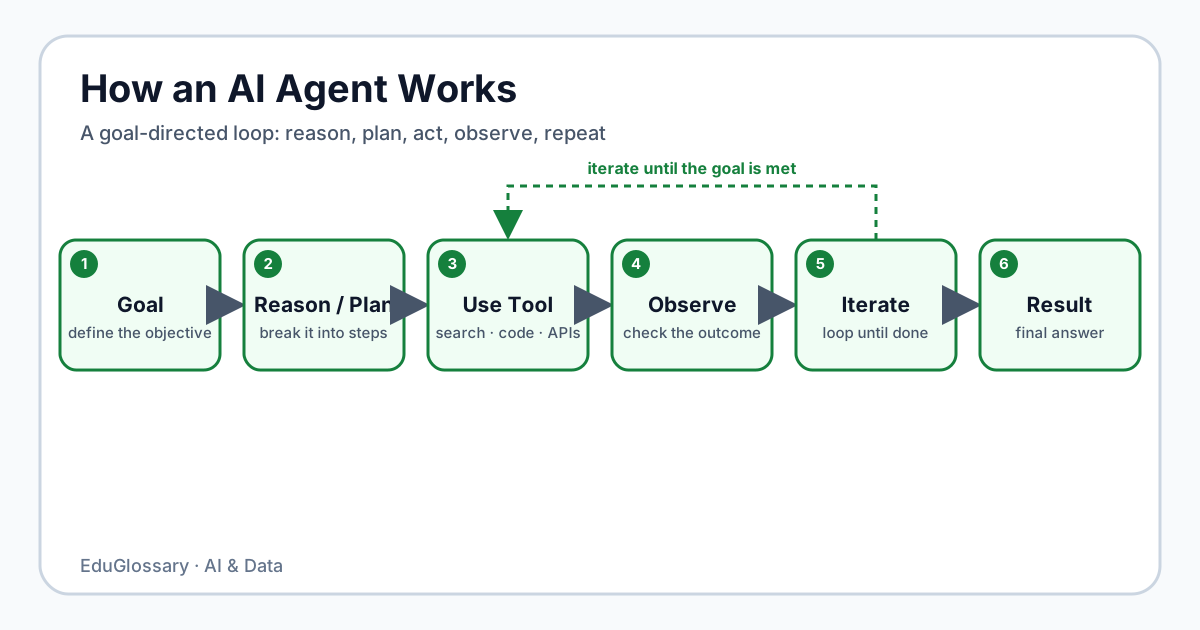
AI agents operate through a continuous loop often called the agent loop or reasoning loop. The basic flow looks like this:
Goal ↓Reason (What do I need to do?) ↓Plan (What steps should I take?) ↓Act / Use Tool (Execute a step) ↓Observe (What happened? What did I learn?) ↓Continue? ↙ ↘ Yes No ↓ ↓Loop Result1. Goal
Every agent starts with a goal or objective. This could come from a user prompt (“Summarize this research paper”), a scheduled trigger (“Check for security updates daily”), or another agent (“Here’s the data you requested, now analyze it”).
The goal defines what success looks like and gives the agent a target to work toward.
2. Reasoning
The agent uses its LLM to reason about the goal. It asks itself questions like:
- What does this goal actually require?
- What information do I already have?
- What information do I need to gather?
- What tools are available to me?
This reasoning step is where the agent demonstrates intelligence beyond simple pattern matching.
3. Planning
Based on its reasoning, the agent creates a plan — a sequence of steps to achieve the goal. A good plan is:
- Decomposed into manageable steps
- Ordered logically (dependencies first)
- Flexible enough to adapt if something changes
For example, to “Find the best flight,” the plan might be:
- Search flights for the date and route
- Filter by price and duration
- Check baggage policies for top options
- Compare total cost including fees
- Present recommendation
4. Tool Use
The agent executes steps by using tools. Common tools include:
- Web search — finding current information
- Code execution — running calculations, data analysis
- API calls — interacting with external services
- File operations — reading/writing documents
- Browser automation — navigating websites
Each tool extends the agent’s capabilities beyond what the LLM can do alone.
5. Observation
After using a tool, the agent observes the result:
- Did the tool succeed or fail?
- What information did it return?
- Does this change my understanding?
- Do I need to adjust my plan?
6. Iteration
Based on the observation, the agent decides whether to continue the loop or complete the task. If the goal isn’t yet achieved, it returns to reasoning with new information. This iteration is what allows agents to handle complex, multi-step tasks.
7. Completion
When the agent determines the goal is achieved (or cannot be achieved), it returns a final result to the user. This might be an answer, a created artifact, a summary, or a notification.
Main Components of an AI Agent
| Component | Role | Example |
|---|---|---|
| Model | The LLM that provides reasoning, planning, and language capabilities | GPT-4, Claude, Gemini |
| Instructions/Goals | Defines what the agent should do, its constraints, and success criteria | System prompt, user prompt |
| Tools | External capabilities the agent can invoke | Web search, code interpreter, API client |
| Memory/State | Tracks conversation history, intermediate results, and context | Short-term (session) + long-term (vector DB) |
| Orchestration/Runtime | Coordinates the loop: calls model, executes tools, manages state | LangGraph, AutoGen, custom loop |
ModelInstructionsToolsMemoryOrchestration ↓ AI AgentA Simple AI Agent Example
Imagine you ask an AI agent: “Create a Python script that fetches the current Bitcoin price and saves it to a CSV file with a timestamp.”
The agent might execute this loop:
- Reason: I need to write Python code that uses an API to get Bitcoin price, then save to CSV.
- Plan:
- Find a free Bitcoin price API
- Write the Python script
- Test it runs correctly
- Act: Search web for “free Bitcoin price API” → finds CoinGecko API
- Act: Write Python script using
requestsandcsvmodules - Act: Run the script to verify it works
- Observe: Script runs successfully, CSV created with price and timestamp
- Complete: Return the script to user
AI Agent vs Chatbot
| Aspect | Chatbot | AI Agent |
|---|---|---|
| Primary mode | Conversational response | Goal-directed action |
| Autonomy | Low — waits for each user message | High — can take multiple steps independently |
| Tools | Usually none or limited | Extensive tool use (search, code, APIs) |
| Memory | Conversation history only | Working memory + long-term storage |
| Planning | None | Multi-step planning and adaptation |
| Example | “What’s the weather?” → “It’s 72°F” | “Plan my weekend trip” → Books flights, hotel, creates itinerary |
A chatbot responds. An agent acts.
AI Agent vs AI Assistant
These terms are often used interchangeably, but a useful distinction:
- AI Assistant — A general-purpose helper you converse with (e.g., ChatGPT, Claude). You ask, it answers. It may use tools, but the interaction is primarily chat-based.
- AI Agent — A system deployed to accomplish specific objectives, often running autonomously or semi-autonomously. You give it a goal; it works toward it.
An assistant is something you talk to. An agent is something you delegate to.
AI Agent vs Workflow
| Aspect | Workflow | AI Agent |
|---|---|---|
| Definition | Predefined sequence of steps | Dynamic, goal-directed loop |
| Flexibility | Fixed — same steps every time | Adapts based on observations |
| Decision-making | Hardcoded rules/conditions | LLM-based reasoning |
| Error handling | Predefined fallbacks | Can reason about failures and retry differently |
| Use case | Repeatable, well-understood processes | Open-ended, ambiguous, or novel tasks |
A workflow is a recipe. An agent is a chef who can improvise when an ingredient is missing.
AI Agent vs Traditional Automation
| Aspect | Traditional Automation (RPA, scripts) | AI Agent |
|---|---|---|
| Logic | Explicit rules (if X then Y) | Learned reasoning + rules |
| Adaptability | Breaks when inputs change | Handles variation and ambiguity |
| Maintenance | Update rules for every change | Often self-adjusts via reasoning |
| Scope | Narrow, repetitive tasks | Broad, cognitive tasks |
Traditional automation follows instructions. AI agents follow intent.
Common AI Agent Use Cases
Research & Analysis
- Market research agents that browse, synthesize, and report
- Code analysis agents that audit repositories for security issues
- Literature review agents that summarize academic papers
Coding & Development
- Coding agents that write, test, and debug code (e.g., GitHub Copilot Workspace, Devin)
- Code migration agents that translate between languages/frameworks
- Documentation agents that keep docs in sync with code
Customer Support
- Support agents that resolve tickets by accessing knowledge bases and taking actions (refunds, account changes)
- Triage agents that categorize and route incoming requests
Personal Productivity
- Email agents that draft replies, schedule meetings, prioritize inbox
- Calendar agents that optimize scheduling across time zones
- Research agents that monitor topics and deliver summaries
Business Operations
- Data extraction agents that process invoices, contracts, forms
- Monitoring agents that watch metrics and alert on anomalies
- Workflow agents that coordinate multi-step business processes
How Autonomous Are AI Agents?
Autonomy is a spectrum, not a binary.
| Level | Description | Example |
|---|---|---|
| Level 0 | No autonomy — direct control | Calculator, basic chatbot |
| Level 1 | Assisted — suggests, human approves | Copilot suggesting code |
| Level 2 | Partial — acts within narrow scope | Agent that books flights after confirmation |
| Level 3 | Conditional — handles most cases, escalates edge cases | Customer support agent |
| Level 4 | High — operates independently in defined domain | Trading agent with risk limits |
| Level 5 | Full — sets own goals, operates indefinitely | Hypothetical future AGI |
This spectrum is illustrative rather than an industry-wide standard. In practice, production agents can operate at different levels of autonomy depending on their tools, guardrails, approval requirements, and task scope.
Limitations and Risks
Reliability
- Agents can get stuck in loops
- Tool failures can cascade
- Reasoning errors compound across steps
Cost & Latency
- Each reasoning step calls an LLM (cost + time)
- Complex tasks may require dozens of iterations
- Not suitable for real-time, low-latency requirements
Security
- Tool use expands attack surface (code execution, API access)
- Prompt injection can hijack agent behavior
- Data privacy when agents access sensitive systems
Evaluation
- Hard to test agent behavior systematically
- Non-deterministic outcomes
- Success criteria can be subjective
Over-reliance
- Agents may confidently produce wrong answers
- Human oversight remains essential for high-stakes tasks
- “Automation bias” — trusting agent output without verification
FAQ
What is the difference between an AI agent and a chatbot?
A chatbot responds to messages in a conversation. An AI agent pursues a goal by reasoning, planning, using tools, and iterating until the task is complete. Chatbots are conversational; agents are operational.
Do AI agents require LLMs?
Many modern AI agents use LLMs for reasoning and planning, but an AI agent does not inherently require an LLM. Simpler agents can use rules, search, planning algorithms, or other AI techniques depending on the task.
Can AI agents replace human workers?
AI agents excel at specific, well-scoped tasks (data extraction, code generation, research synthesis). They complement human work rather than replace entire roles. Human judgment, creativity, and accountability remain essential.
Are AI agents safe to use?
With proper guardrails: sandboxed tool execution, approval gates for sensitive actions, monitoring, and clear scope limits. Like any powerful tool, safety depends on implementation.
What tools can AI agents use?
Common tools: web search, code execution (Python, JavaScript), HTTP/API clients, file read/write, browser automation, database queries, and custom functions. The toolset defines the agent’s capabilities.
How do I build an AI agent?
Frameworks like LangGraph, AutoGen, CrewAI, and LangChain provide orchestration infrastructure. You define the model, tools, prompts, and loop logic. Custom loops are also common for simpler agents.
What is “agentic” workflow?
An agentic workflow is a process where an AI agent (or multiple agents) handles steps that traditionally required human decision-making, adapting dynamically rather than following a fixed script.
Related Concepts
- Large Language Models (LLM) — The reasoning engine behind most modern AI agents
- Retrieval-Augmented Generation (RAG) — How agents access external knowledge
- Vector Database — Long-term memory for agents
- Machine Learning — Foundation of AI capabilities
- Natural Language Processing — How agents understand and generate language
- Chatbot — Conversational interface, distinct from agents
- Training Data — What models learn from
This article is part of the EduGlossary AI & Data category. Explore related topics in Machine Learning, Natural Language Processing, and Deep Learning for more foundational concepts. For a structured learning path, visit the AI & Data hub.