When you ask an AI assistant a question about your company’s private documents, or when a recommendation system suggests a movie you might like — a vector database is often working behind the scenes.
Vector databases are specialized systems designed to store, index, and search high-dimensional vectors efficiently. They are the backbone of modern AI applications including semantic search, recommendation engines, and retrieval-augmented generation (RAG).
This guide explains what vector databases are, how they work, and why they matter for AI.
What Is a Vector Database?
A vector database is a database optimized for storing and querying vectors — arrays of numbers that represent the semantic meaning of data.
Traditional databases (SQL, NoSQL) excel at exact matches and structured queries:
- “Find user with ID 123”
- “Find orders > $100 placed in January”
Vector databases excel at similarity search:
- “Find documents similar to this question”
- “Find products like this one”
- “Find images that look like this”
They power the “fuzzy” matching that makes AI applications feel intelligent.
What Is a Vector?
In this context, a vector is a list of numbers (typically hundreds or thousands) that represents the semantic content of a piece of data — text, image, audio, or any other format.
[0.12, -0.45, 0.78, 0.03, -0.91, 0.56, ...] // 768 dimensionsEach number (dimension) captures some aspect of the data’s meaning. Similar data gets similar vectors — they cluster together in high-dimensional space.
For text, “king” and “queen” have vectors that are close together. “King” and “banana” are far apart.
What Is an Embedding?
An embedding is the process of converting raw data (text, images, etc.) into vectors using an embedding model.
Embedding models (like OpenAI’s text-embedding-3-small, Cohere’s embed models, or open-source alternatives like BGE, E5) are neural networks trained to map semantic meaning to numerical space.
"Apple released a new iPhone" ↓Embedding Model ↓[0.23, -0.11, 0.87, 0.05, -0.42, ...] // 1536 dimensionsThe same embedding model must be used for both storing data and querying it, so vectors are in the same semantic space.
How Does a Vector Database Work?
1. Documents Become Chunks
Raw documents (PDFs, web pages, code files) are split into smaller pieces called chunks — typically a few hundred tokens each. Chunking makes content searchable and ensures pieces fit within LLM context windows.
Long Document → Chunk 1 → Chunk 2 → Chunk 3 → ...2. Chunks Become Embeddings
An embedding model converts each chunk into a vector:
Chunk 1 → [0.12, -0.45, 0.78, ...]Chunk 2 → [0.34, 0.12, -0.56, ...]Chunk 3 → [-0.21, 0.89, 0.03, ...]3. Vectors Are Stored and Indexed
The vector database stores vectors alongside their metadata (source document, chunk text, timestamps) and builds an index for fast similarity search.
Indexing algorithms (HNSW, IVF, PQ) organize vectors so similar ones are near each other, enabling sub-millisecond search across millions of vectors.
4. Similarity Search
When a user asks a question:
User Query: "How do I reset my password?" ↓Query Embedding → [0.15, -0.38, 0.81, ...] ↓Vector Database → Similarity Search ↓Top-K Similar Chunks ReturnedThe database finds vectors closest to the query vector using distance metrics.
Similarity Search
Similarity between vectors is measured using distance metrics. The three most common:
Cosine Similarity
Measures the angle between vectors. Ranges from -1 (opposite) to 1 (identical). Most common for text embeddings because it ignores magnitude (length of text) and focuses on direction (semantic meaning).
cosine_similarity(A, B) = (A · B) / (||A|| × ||B||)Euclidean Distance
Measures straight-line distance between vectors. Lower = more similar. Sensitive to magnitude.
distance = sqrt(Σ(Aᵢ - Bᵢ)²)Dot Product
Measures projection of one vector onto another. Faster to compute but only meaningful when vectors are normalized.
dot_product(A, B) = Σ(Aᵢ × Bᵢ)For text embeddings, cosine similarity is the default choice.
Vector Database and RAG
RAG (Retrieval-Augmented Generation) is one of the most prominent use cases for vector databases in modern AI applications.
The RAG Flow
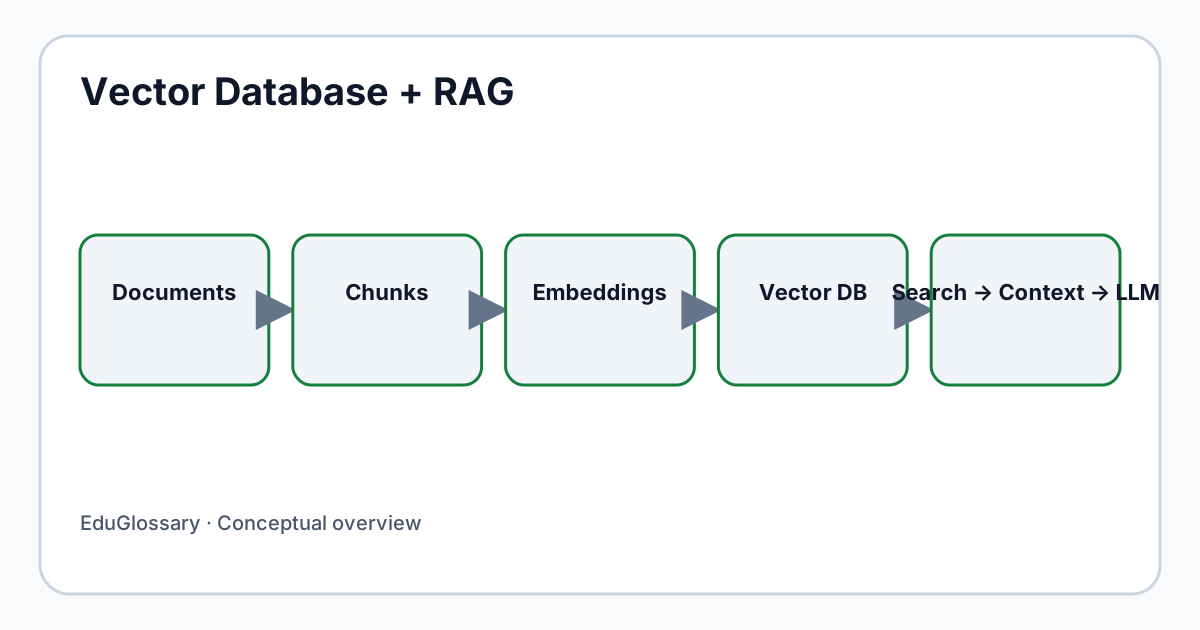
Documents ↓Embedding Model ↓Vectors ↓Vector Database ↓Similarity Search ↑User Query → Query Embedding ↓Relevant Context (Top-K Chunks) ↓LLM + Context ↓AnswerStep-by-Step Example
Scenario: Company wants an AI assistant that answers questions from internal documentation.
-
Ingestion (one-time or periodic):
- Collect PDFs, wikis, Notion pages
- Chunk into ~500-token pieces
- Generate embeddings using
text-embedding-3-small - Store in vector database with metadata (source, page, section)
-
Query Time (per user question):
- User asks: “What’s our remote work policy?”
- Embed query →
[0.21, -0.14, 0.77, ...] - Vector DB searches for top-5 similar chunks
- Returns: HR policy doc chunks about remote work
- LLM receives: query + retrieved chunks
- LLM generates grounded answer with citations
The vector database is what makes the “retrieval” in RAG fast and accurate.
Vector Database vs Traditional Database
| Aspect | Traditional (SQL/NoSQL) | Vector Database |
|---|---|---|
| Query Type | Exact match, range, filter | Approximate nearest neighbor (ANN) |
| Data Model | Tables, documents, key-value | Vectors + metadata |
| Indexing | B-tree, hash, LSM-tree | HNSW, IVF, PQ, DiskANN |
| Strength | Precision, transactions, structure | Semantic similarity, scale |
| Use Case | “Find order #12345” | “Find docs about refund policy” |
Vector databases are not replacements for traditional databases. They complement them:
- Traditional DB: User accounts, orders, inventory, logs
- Vector DB: Document search, recommendations, RAG context
Many applications use both.
Vector Database vs Vector Search
Vector search is a capability — the ability to find similar vectors. Vector database is a system that provides vector search plus:
- Persistent storage
- CRUD operations (insert, update, delete)
- Metadata filtering (filter by date, category, user_id)
- Scalability (sharding, replication)
- Consistency guarantees
- Backup/restore
- Access control
Some systems add vector search to existing databases (PostgreSQL + pgvector, Elasticsearch, OpenSearch, Redis). These are hybrid systems — useful when you already have that infrastructure. Dedicated vector databases (Pinecone, Weaviate, Qdrant, Milvus, Chroma) are purpose-built for vector workloads at scale.
Common Uses
| Application | How Vector DB Helps |
|---|---|
| RAG / AI Assistants | Retrieves relevant context for LLMs |
| Semantic Search | Finds content by meaning, not keywords |
| Recommendations | “Users who liked X also liked Y” via vector similarity |
| Image Search | Find similar images (reverse image search) |
| Anomaly Detection | Vectors far from normal cluster = anomalies |
| Deduplication | Find near-duplicate documents |
| Classification | Nearest-neighbor classification |
Advantages
- Semantic understanding — Finds conceptually related content, not just keyword matches
- Scale — Handles millions to billions of vectors with sub-millisecond latency
- Flexibility — Works with any data type that can be embedded (text, images, audio, code)
- Metadata filtering — Combine vector similarity with traditional filters (e.g., “similar docs from last month by author X”)
- Real-time updates — Insert/delete vectors without full reindex (in most systems)
Limitations
- Approximate results — ANN algorithms trade perfect accuracy for speed; exact nearest neighbor is slow at scale
- No ACID transactions — Most vector DBs don’t support multi-vector transactions
- Embedding dependency — Quality depends entirely on the embedding model; bad embeddings = bad search
- Dimension curse — High dimensions require more storage and compute; some indexes degrade
- Cost — Specialized infrastructure; managed services can be expensive at scale
- Not for exact queries — Don’t use for “find user by email” — use a traditional DB
FAQ
What is the difference between a vector database and a traditional database?
Traditional databases excel at exact matches and structured queries. Vector databases excel at similarity search — finding data by semantic meaning rather than exact values.
Do I need a vector database for RAG?
For production RAG with more than a few thousand documents, yes. For small prototypes, you can use in-memory search or pgvector in PostgreSQL. At scale, a dedicated vector database provides better performance, filtering, and operational tooling.
What embedding model should I use?
As of 2026, strong general-purpose options:
- OpenAI:
text-embedding-3-small(1536 dim, fast, cheap),text-embedding-3-large(3072 dim, higher quality) - Cohere:
embed-english-v3.0,embed-multilingual-v3.0 - Open source: BGE (BAAI), E5 (Microsoft), Nomic Embed Text Choose based on language, domain, latency, and cost requirements.
How many dimensions do vectors have?
Typical ranges: 384–3072 dimensions. More dimensions = more semantic nuance but larger storage and slower search. 768–1536 is a common sweet spot.
Can I use a vector database for exact lookups?
Not efficiently. Vector databases are optimized for approximate nearest neighbor search. Use a traditional database (PostgreSQL, MongoDB) for exact-match queries like “find user by ID.”
What is HNSW?
Hierarchical Navigable Small World — the most popular vector indexing algorithm. Builds a multi-layer graph where each layer connects vectors at different granularities. Enables fast, accurate approximate search. Used by Pinecone, Weaviate, Qdrant, Milvus, and pgvector.
Are vector databases only for AI?
No. They’re useful anywhere similarity matters: recommendation systems, fraud detection (anomaly = far from normal), image search, plagiarism detection, clustering.
Related Concepts
- Embeddings — How data becomes vectors (see Training Data for foundational concepts)
- Retrieval-Augmented Generation (RAG) — Primary use case for vector databases
- Large Language Models (LLM) — Consumes retrieved context from vector DB
- Machine Learning — Foundation of embedding models
- Natural Language Processing — Text understanding for embeddings
- AI Agent — Agents often use vector DBs for memory
- Chatbot — RAG-powered chatbots use vector DBs
This article is part of the EduGlossary AI & Data category. Explore related topics in Machine Learning, Natural Language Processing, and Deep Learning. For a structured learning path, visit the AI & Data hub.
Sources
- Vector database choices in RAG Engine — Google Cloud
- Use embedding models with RAG Engine — Google Cloud
- Retrievers for RAG workflows — AWS Prescriptive Guidance
Evaluating retrieval quality in a real application
A vector database should be evaluated against the questions users actually ask. Build a small benchmark with representative queries, relevant passages, difficult near-matches, and examples where the correct result is that no document is relevant. Measure whether the useful passage appears near the top of the results, then inspect cases where semantically similar but factually irrelevant chunks are retrieved. The embedding model, chunk size, overlap, metadata filters, distance metric, and index settings can all affect the outcome. Change one variable at a time where practical so that improvements can be explained rather than guessed.
Freshness, deletion, and access control
When a source document changes, its chunks and vectors need an update or removal process. Otherwise, the retrieval layer can surface superseded guidance even after the primary document has been corrected. Track source identifiers and versions with each indexed chunk, and test the full delete path, including backups or replicas where applicable. For multi-tenant applications, enforce tenant and document permissions before returning retrieved content; filtering by similarity alone is not an authorization mechanism.
Production observability and failure handling
Log operational metadata such as query latency, number of candidates, filter outcome, and index version while minimizing retention of sensitive query text. Watch for empty result sets, unusually broad retrieval, indexing delays, and changes in embedding-model behavior. If the vector service is unavailable, define whether the application falls back to keyword search, returns a clear temporary error, or asks a human to review the request. The fallback should not silently answer using stale or unrelated context.
A vector database is one component in a retrieval pipeline. Overall quality depends on source-document quality, parsing, chunking, embeddings, filtering, ranking, generation, and evaluation. Treat the database choice as an architectural decision to validate with realistic data, security requirements, and lifecycle tests rather than assuming that semantic similarity alone produces correct answers.