Every time you use a weather app, log into a website with Google, or pay for something online — a REST API is likely doing the work behind the scenes.
REST API (Representational State Transfer Application Programming Interface) is one of the most widely used approaches for building web APIs and enabling software applications to communicate over the internet. Despite the technical name, the core idea is straightforward: a REST API lets one application request data or actions from another using standard web protocols.
This guide explains what REST APIs are, how they work, and what beginners need to know to start using them.
What Is an API?
Before understanding REST, it helps to understand what an API is.
API stands for Application Programming Interface. It is a set of rules that allows one piece of software to talk to another. Think of it like a waiter in a restaurant:
- You (the client) want something from the kitchen (the server)
- The waiter (the API) takes your order, brings it to the kitchen, and returns your food
- You don’t need to know how the kitchen works — you just order from the menu
The API defines what requests you can make, how to make them, and what responses to expect. For a deeper explanation, see What is an API? A Complete Beginner’s Guide.
What Does REST Mean?
REST stands for Representational State Transfer. It is an architectural style — a set of design principles — created by Roy Fielding in his 2000 doctoral dissertation.
REST is not a protocol, a library, or a specific technology. It is a way of designing APIs that makes them predictable, scalable, and easy to use. APIs that follow REST principles are called RESTful APIs (or simply REST APIs).
The core REST principles:
- Resources — Everything is a resource (users, orders, products) identified by a URL
- Stateless — Each request contains all information needed; the server doesn’t remember you between requests
- Standard HTTP methods — Use GET, POST, PUT, PATCH, DELETE for actions
- Representations — Resources are represented in formats like JSON or XML
What Is a REST API?
A REST API is an API that follows the REST architectural style. It uses standard HTTP to let clients interact with resources on a server.
Many public web APIs use REST-style interfaces, although APIs can also use other approaches such as GraphQL, gRPC, SOAP, or protocol-specific designs. Services may also expose more than one API style. They are popular because they work with any programming language, are easy to debug, and leverage existing web infrastructure (caching, load balancing, security).
How Does a REST API Work?
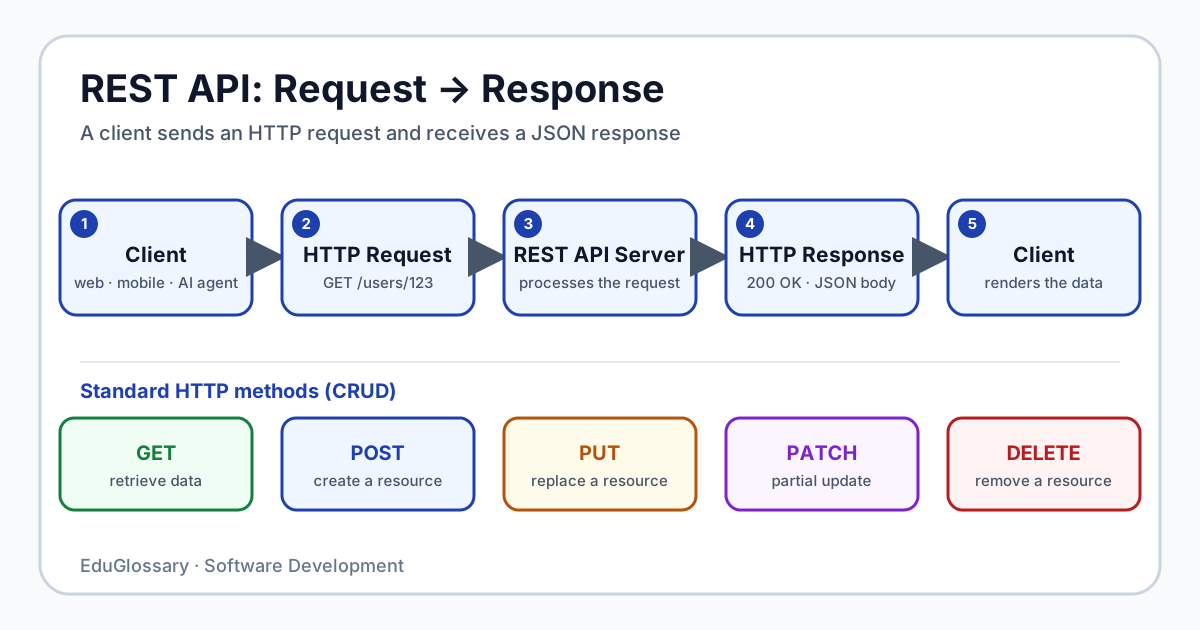
REST APIs operate on a request-response cycle over HTTP:
Client ↓ HTTP Request (GET /users/123)REST API Server ↓Database / Business Logic ↓ HTTP Response (200 OK + JSON)ClientThe Flow
- Client sends a request to a specific URL (endpoint) with an HTTP method
- Server processes the request — validates, runs logic, queries database
- Server responds with a status code and data (usually JSON)
HTTP Methods
REST maps CRUD (Create, Read, Update, Delete) operations to standard HTTP methods:
| Method | Purpose | Example | Idempotent? |
|---|---|---|---|
| GET | Retrieve data | GET /users/123 |
Yes |
| POST | Create new resource | POST /users |
No |
| PUT | Replace entire resource | PUT /users/123 |
Yes |
| PATCH | Partially update resource | PATCH /users/123 |
No |
| DELETE | Remove resource | DELETE /users/123 |
Yes |
Idempotent means making the same request multiple times has the same effect as making it once. GET, PUT, and DELETE are idempotent — safe to retry. POST and PATCH are not — retrying may create duplicates or apply changes twice.
GET — Retrieve Data
The most common method. Should only read data, never modify it.
GET /api/articles/42Response:
{ "id": 42, "title": "Understanding REST APIs", "author": "Alex Chen", "published": "2026-01-15"}POST — Create a Resource
Sends data to create a new resource. The server typically generates the ID.
POST /api/articlesContent-Type: application/json
{  "title": "My New Article",  "content": "Article content here..."}
Response (201 Created):
{ "id": 43, "title": "My New Article", "content": "Article content here...", "created_at": "2026-10-05T10:30:00Z"}PUT — Replace a Resource
Replaces the entire resource. Client must send the complete representation.
PUT /api/articles/43Content-Type: application/json
{  "title": "Updated Title",  "content": "Completely new content",  "author": "Alex Chen"}
PATCH — Partially Update
Updates only the fields provided. More efficient for small changes.
PATCH /api/articles/43Content-Type: application/json
{  "title": "Just the Title Changed"}
DELETE — Remove a Resource
Removes the resource. Typically returns 204 No Content on success.
DELETE /api/articles/43Response: 204 No Content (empty body)
What Is an Endpoint?
An endpoint is a specific URL where an API can be accessed. Each endpoint represents a resource or collection.
| Endpoint | Meaning |
|---|---|
GET /users |
List all users |
GET /users/123 |
Get user with ID 123 |
POST /users |
Create a new user |
GET /users/123/orders |
Get orders for user 123 |
GET /products?category=electronics&limit=10 |
Filtered, paginated list |
Good REST APIs use nouns for resources, not verbs:
- ✅
GET /users - ❌
GET /getUsers
Request and Response
Request Components
| Component | Description |
|---|---|
| Method | GET, POST, PUT, PATCH, DELETE |
| URL/Endpoint | https://api.example.com/users/123 |
| Headers | Metadata: Content-Type: application/json, Authorization: Bearer token |
| Body | Data sent with POST/PUT/PATCH (usually JSON) |
Response Components
| Component | Description |
|---|---|
| Status Code | 200, 201, 404, 500, etc. |
| Headers | Metadata: Content-Type, caching headers |
| Body | Response data (usually JSON) |
JSON in REST APIs
JSON (JavaScript Object Notation) is the de facto standard for REST API data exchange. It is lightweight, human-readable, and supported by every programming language.
{ "id": 123, "name": "Alex", "roles": ["admin", "developer"], "active": true, "metadata": { "created": "2026-01-15T09:30:00Z", "last_login": "2026-10-05T08:15:00Z" }}Why JSON?
- Native JavaScript support (
JSON.parse(),JSON.stringify()) - Universal library support in Python, Go, Java, Rust, etc.
- Self-describing structure (keys + values)
- Smaller than XML
HTTP Status Codes
Status codes tell the client what happened. REST APIs should use standard codes:
Success (2xx)
| Code | Meaning |
|---|---|
| 200 OK | Request succeeded (GET, PUT, PATCH) |
| 201 Created | Resource created (POST) — include Location header |
| 204 No Content | Success, no body to return (DELETE) |
Client Errors (4xx)
| Code | Meaning |
|---|---|
| 400 Bad Request | Invalid input, malformed JSON |
| 401 Unauthorized | Missing or invalid authentication |
| 403 Forbidden | Authenticated but not allowed |
| 404 Not Found | Resource doesn’t exist |
| 422 Unprocessable Entity | Valid JSON but validation failed |
| 429 Too Many Requests | Rate limit exceeded |
Server Errors (5xx)
| Code | Meaning |
|---|---|
| 500 Internal Server Error | Unexpected server failure |
| 502 Bad Gateway | Invalid upstream response |
| 503 Service Unavailable | Server temporarily overloaded |
Simple REST API Example
Let’s walk through a complete example using a fictional task management API.
Get All Tasks
GET https://api.taskapp.com/v1/tasksResponse (200 OK):
{ "data": [ { "id": 1, "title": "Learn REST", "completed": true }, { "id": 2, "title": "Build an API", "completed": false } ], "meta": { "total": 2 }}Create a Task
POST https://api.taskapp.com/v1/tasksContent-Type: application/jsonAuthorization: Bearer abc123
{ "title": "Write documentation" }
Response (201 Created):
{ "id": 3, "title": "Write documentation", "completed": false, "created_at": "2026-10-05T12:00:00Z"}Update a Task
PATCH https://api.taskapp.com/v1/tasks/3Content-Type: application/jsonAuthorization: Bearer abc123
{ "completed": true }
Response (200 OK):
{ "id": 3, "title": "Write documentation", "completed": true, "updated_at": "2026-10-05T12:05:00Z"}Delete a Task
DELETE https://api.taskapp.com/v1/tasks/3Authorization: Bearer abc123Response: 204 No Content
REST API vs API
| Aspect | API (General) | REST API |
|---|---|---|
| Definition | Any interface for software communication | API following REST architectural style |
| Protocol | Can use any protocol | Uses HTTP |
| Structure | Varies widely | Resource-based, standard methods |
| Examples | gRPC, GraphQL, SOAP, library functions | GitHub API, Stripe API, Twitter API |
All REST APIs are APIs. Not all APIs are REST APIs.
REST API vs GraphQL
| Property | REST | GraphQL |
|---|---|---|
| Endpoints | Multiple (one per resource) | Single endpoint |
| Data fetching | Server decides response shape | Client specifies exact fields |
| Over-fetching | Common (extra data returned) | Eliminated |
| Under-fetching | Requires multiple requests | Single request |
| Caching | Standard HTTP caching | Requires custom tooling |
| Learning curve | Low | Moderate |
REST is simpler for most cases. GraphQL shines when clients have complex, varying data needs (dashboards, mobile apps with different views).
Advantages of REST APIs
- Simplicity — Uses familiar HTTP, easy to understand and debug
- Universality — Works with any language, any platform
- Caching — Standard HTTP caching (ETag, Cache-Control) works out of the box
- Scalability — Stateless design enables horizontal scaling
- Tooling — Mature ecosystem: OpenAPI/Swagger, Postman, testing frameworks
- Flexibility — Supports multiple formats (JSON, XML, plain text)
Limitations of REST APIs
- Over-fetching — GET
/users/123returns all fields even if you only need the name - Under-fetching — Getting user + their posts may require 2+ requests
- Versioning — Breaking changes often require new versions (
/v1/,/v2/) - No standard for relationships — Nested resources handled differently across APIs
- Chatty — Complex operations may need many round trips
Common Beginner Mistakes
| Mistake | Why It’s Wrong | Better Approach |
|---|---|---|
| Using verbs in URLs | /getUsers, /createUser |
Use nouns: /users with HTTP methods |
| Returning 200 for errors | { "error": "Not found" } with 200 OK |
Use proper status codes: 404 |
| PUT for partial updates | Replaces entire resource | Use PATCH for partial updates |
| No versioning | Breaking changes break clients | Include version: /v1/users |
| Ignoring rate limits | 429 errors crash the app | Implement exponential backoff |
| Skipping authentication | Anyone can access/modify data | Use API keys, OAuth, or JWT |
FAQ
What is the difference between REST and RESTful?
REST is the architectural style. RESTful means an API follows REST principles. In practice, they’re used interchangeably — a “REST API” is expected to be RESTful.
Do all REST APIs use JSON?
No. REST doesn’t mandate a format. JSON is most common, but XML, plain text, and others are valid. The Content-Type header indicates the format.
What is an API key vs OAuth?
API key — Simple string identifier for the calling application. Easy but less secure for user data. OAuth — Authorization framework letting users grant limited access without sharing passwords (e.g., “Sign in with Google”).
How do I handle API versioning?
Common approaches:
- URL versioning:
/api/v1/users(most visible, cacheable) - Header versioning:
Accept: application/vnd.myapi.v1+json(clean URLs) - Query param:
/users?version=1(simple but less explicit)
What is rate limiting?
Restricting how many requests a client can make in a time window (e.g., 100 requests/minute). Protects the API from abuse. Returns 429 Too Many Requests with Retry-After header when exceeded.
How do I make my first REST API call?
Use curl from terminal:
curl https://api.github.com/users/octocatOr use Postman, Insomnia, or browser dev tools. No code required to try.
Related Concepts
- API — The broader concept of application programming interfaces
- API Gateway — Traffic management layer for APIs
- GraphQL — Flexible query language alternative to REST
- Full Stack Development — Building both client and server
- Codebase — Source code organization
- OAuth — Authorization framework for API access
- JWT — Token-based authentication for APIs
This article is part of the EduGlossary Software Development category. Explore related topics in the Software Development hub.