GitHub Actions can test code, build packages, publish releases, and deploy applications automatically. The same automation can become a high-value target because workflows often have access to repository write permissions, package registries, cloud credentials, and deployment environments. If a workflow or third-party action is compromised, an attacker may be able to turn a routine build into a path for stealing secrets, modifying releases, or deploying unauthorized code.
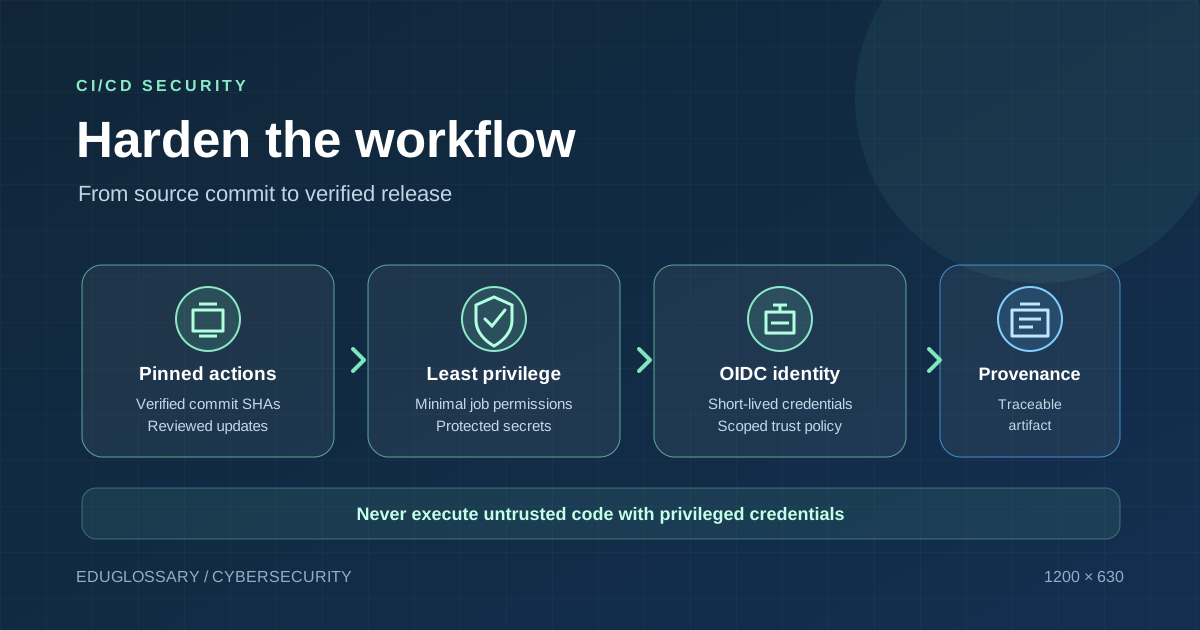
GitHub’s current security guidance emphasizes several complementary protections: pin third-party actions to full commit SHAs, restrict token permissions, use OpenID Connect (OIDC) for short-lived cloud credentials, establish artifact provenance, and treat external pull-request data as untrusted input. These controls address different risks. Enabling only one does not make a CI/CD pipeline secure.
This guide turns those principles into an actionable hardening plan for maintainers, platform engineers, and development teams.
Why CI/CD workflows are part of the software supply chain
A source repository is not the only place where software can be changed. A workflow decides which code is fetched, which commands run, what secrets become available, which artifacts are produced, and where those artifacts are published. A compromise in this path can affect releases even when the application’s main codebase has no obvious vulnerability.
A threat actor may target a maintainer account, a third-party action, a mutable version tag, a workflow file, an exposed token, a self-hosted runner, or an untrusted pull request. The consequences depend on the workflow’s permissions and reachable resources. A read-only test job has a smaller blast radius than a deployment job that can publish packages and change production infrastructure.
This is why workflow security should be designed around least privilege and separation of duties. A workflow should have only the permissions required for its job. Steps that build untrusted code should not automatically receive production credentials. Publication and deployment should be separated from routine testing where practical, with reviewed promotion steps for important releases.
1. Pin third-party actions to full commit SHAs
GitHub’s secure-use guidance states that pinning an action to a full-length commit SHA is the only way to reference an immutable release of that action. A workflow that uses a version tag such as a major-version label is easier to read, but a tag can move. If the repository owner or an attacker changes what the tag points to, a workflow may execute different code without a corresponding edit in your repository.
A full commit SHA provides an immutable reference to the particular Git object you reviewed. It is not enough to paste any SHA: verify that it belongs to the intended upstream repository, inspect the change you are pinning, and update the reference through a reviewed pull request when you want to adopt a newer release.
A maintainable policy should standardize how actions are pinned and updated. Keep a record of the upstream repository and the human-readable release corresponding to each pinned SHA. Use automation or dependency-update tooling to propose changes, but retain review and testing. Avoid switching a SHA for a tag merely to make the workflow shorter.
Pinning reduces the risk of a tag being moved; it does not make the action’s code inherently safe. A legitimate upstream release can contain a vulnerability, and a repository itself can be compromised. Keep dependencies current, review security advisories, and limit the action’s ability to access secrets or write to the repository.
Official guidance: GitHub secure-use reference.
2. Set minimum permissions for GITHUB_TOKEN
Workflows receive a GitHub token whose permissions depend on repository and organization settings and the workflow’s configuration. Broad permissions can transform a compromised step into a repository-level incident. GitHub recommends granting the token the minimum required permissions, and its secure-use reference recommends read-only repository-content access as a secure default where possible.
Start by declaring permissions explicitly at the workflow level, then elevate permissions only for jobs that require them. A test job that reads source code generally does not need permission to publish releases or modify repository settings. A release job may need a narrowly scoped write permission, but that does not mean every job in the same workflow needs it.
Review both the permissions block and the actions used in the workflow. An action may access the token through the GitHub context even when the workflow does not pass the token to it explicitly. Treat each third-party action as code running inside your trusted automation environment.
Also review permissions at repository and organization level, including which actions are allowed and who can modify workflow files.
3. Replace long-lived cloud secrets with OIDC where supported
Deployments often need credentials to a cloud provider, container registry, or external service. Long-lived access keys are attractive targets because an attacker who steals one may be able to use it after the original workflow finishes. OIDC enables a workflow to request a short-lived identity token and exchange it for credentials through a supported cloud provider or service.
With OIDC, trust is configured between the workload identity provider and the target system. The target system can evaluate claims about the repository, workflow, branch, environment, or other identity attributes before issuing credentials. The exact claims and configuration depend on the target service, so a copied example is not a substitute for verifying the trust policy.
A secure implementation should narrowly scope the trusted repository and workflow, require the expected branch or protected deployment environment where appropriate, and issue only the permissions needed for the task. Avoid creating a trust rule so broad that unrelated workflows can request production credentials. Review cloud-side role permissions as carefully as workflow-side permissions.
OIDC does not mean the workflow becomes untrusted or harmless. If an attacker can modify and execute a workflow that satisfies the trust policy, it may still obtain the credentials that policy allows. Protect workflow changes, set minimal role permissions, and require deployment approval for high-impact environments.
GitHub’s guidance describes OIDC integrations for multiple cloud providers and services: hardening deployments with OIDC.
4. Treat pull-request content and other external inputs as untrusted
Workflow expressions can include text supplied by an external contributor, such as a pull-request title, issue body, branch name, or commit message. If that text is inserted directly into a shell command, it may be interpreted as code rather than data. GitHub documents this class of issue as script injection.
The safer pattern is to avoid interpolating untrusted values into the body of an inline shell script. Where appropriate, pass values through environment variables or arguments and use a tool that treats them as data. Quote shell variables carefully, validate expected formats, and do not assume that a title or branch name is safe simply because it appears inside a GitHub event.
Be especially careful with privileged events such as pull_request_target and workflow_run. GitHub warns that checking out and executing untrusted pull-request code in a privileged workflow can expose repository secrets, write-capable tokens, or caches. Build scripts, dependency installation, tests, and project configuration can all execute attacker-controlled behavior. Even when the workflow itself appears harmless, its commands can invoke scripts from the checked-out code.
For ordinary validation that does not need secrets, prefer a less privileged workflow trigger. If a privileged workflow must inspect a pull request, separate data inspection from code execution and ensure untrusted content is never run while privileged credentials are available. Consider ephemeral and isolated runners when handling untrusted workloads, especially if self-hosted infrastructure could expose internal network resources.
Sources: GitHub script-injection guidance and securely using pull_request_target.
5. Protect secrets and inspect workflow logs
Secrets can leak through more paths than a simple echo command. Tools may include them in errors, pass them to child processes, or transform them into encoded values that do not match the original redaction pattern. GitHub explicitly notes that automatic redaction is not guaranteed in every case.
Keep sensitive data out of workflow files and source control. Store credentials in the secret or environment facility intended for them, avoid giving them to jobs that do not need them, and use required reviewers for environment secrets in release and deployment workflows when suitable. Regularly review which secrets exist, who can modify the workflows that use them, and whether each credential is still needed.
After changing a workflow, inspect logs from both successful and intentionally failing test cases. Confirm that sensitive values are not printed in normal output or error messages. If a secret appears in an unredacted log or might have been exposed to untrusted code, delete or restrict access to the affected logs where possible and rotate the credential. Do not assume that a masked value is safe if the workflow has sent it to an unintended host.
6. Generate and verify artifact provenance
A successful build does not by itself prove where its artifact came from. Build provenance and artifact attestations create verifiable evidence that connects a built artifact to a source repository, build workflow, or other identity information. This can help downstream systems decide whether an artifact came from an approved process.
GitHub supports artifact attestations as part of its supply-chain security features. Teams can use them to establish build provenance for software they produce and verify provenance for software they consume. The practical value depends on the evidence generated, the identity that signed or attested to it, and whether the deployment process actually checks the evidence.
Do not treat the existence of an attestation as a guarantee that the artifact has no vulnerabilities or malicious code. If a compromised workflow builds malicious software, provenance may accurately describe that compromised build. Combine provenance with protected source branches, review, tests, dependency controls, and policy enforcement that rejects artifacts from unexpected sources.
Where your deployment platform supports it, establish a rule that only artifacts produced by the approved workflow and repository can be promoted. Preserve the artifact digest and provenance record with the release record so that investigators can connect the deployed file to the originating build.
Official overview: security for GitHub Actions.
7. Separate build, publish, and deploy privileges
One of the most effective design changes is to keep ordinary test jobs separate from jobs that publish packages or change production. A test job may need read access to the repository and the ability to upload test output. A package-publishing job needs a publishing identity. A deployment job needs a controlled deployment identity. Combining all of these privileges in every workflow increases the impact of a compromise.
Use protected environments, required reviewers, and explicit release conditions for high-impact jobs. Restrict which branches and tags can publish. Make sure reusable workflows and action inputs cannot be controlled by an untrusted pull request to gain a privileged execution path.
Review cache use as part of the threat model. Untrusted jobs should not be able to poison a cache that a privileged release workflow later trusts. Treat artifacts created by workflows involving forked or external code as untrusted until verified. If self-hosted runners are required, use isolated, ephemeral environments where possible and avoid leaving credentials or build state available to later jobs.
8. Build a repeatable workflow-audit process
A one-time review is useful, but CI/CD configurations change whenever a project adds a job, action, package registry, or deployment environment. Schedule a lightweight audit and repeat it after changes to release automation.
Use this checklist:
- Action references: Are third-party actions pinned to verified full commit SHAs and updated through review?
- Token permissions: Does each workflow and job declare only the permissions it needs?
- Secrets: Are credentials unavailable to jobs that build untrusted code, and are environment secrets protected where appropriate?
- OIDC: Are cloud trust policies scoped to the expected repository, workflow, and environment?
- Untrusted inputs: Are pull-request titles, branch names, issue bodies, artifacts, and code from forks handled as data rather than executed unexpectedly?
- Artifacts: Can the team trace production artifacts to a known commit and build workflow?
- Runner isolation: Can a job leave behind credentials, files, or caches that a later job can access?
- Monitoring and response: Do maintainers know how to revoke credentials, disable a compromised workflow, identify affected runs, and rebuild a trusted artifact?
Do not make compliance a checkbox exercise. Record the reason for each exception, its owner, and the mitigation that limits its impact. Revisit exceptions when the workflow or platform changes.
A staged rollout plan
For small repositories, start with the controls that most directly reduce blast radius: minimum token permissions, SHA-pinned actions, removal of unnecessary secrets, and review of privileged pull-request workflows. Then establish a safer credential path for deployments through OIDC where supported. Finally, add provenance generation and verification to release promotion.
Test each change in a non-production repository or staging environment. A strict permissions policy can break a workflow that legitimately needs write access; the correct solution is to grant the narrow permission to the appropriate job, not to restore broad privileges everywhere. Likewise, switching to OIDC requires a matching trust policy at the target provider. Verify both sides before removing an existing credential.
Frequently asked questions
Is pinning an action to a version tag unsafe?
A tag is mutable, so it does not give the same immutability guarantee as a full commit SHA. Many projects use tags for convenience, but SHA pinning with review is the stronger supply-chain control. Verify the upstream source before pinning and keep updates manageable.
Does OIDC eliminate the risk of credential theft?
OIDC can reduce the need for long-lived credentials in supported workflows, but it does not eliminate risk. A compromised workflow that matches a trust policy may still request the permissions the policy allows. Protect the workflow and narrowly scope the target role.
Should every repository use artifact attestations?
Provenance can be valuable for software that is deployed, published, or consumed by other systems. The controls should match the project’s risk. If provenance is required, ensure the downstream deployment actually verifies it rather than merely generating an attestation that nobody checks.
Is pull_request_target always dangerous?
No. It has legitimate uses, but it runs with a privileged context. The dangerous pattern is executing untrusted pull-request code while those privileges or secrets are available. If ordinary pull-request validation is sufficient, use a less privileged workflow and avoid checking out and executing untrusted content in privileged jobs.
Official sources and further reading
- GitHub secure-use reference — token permissions, third-party action pinning, secrets, and untrusted code.
- Security for GitHub Actions — workflow dependency lockfiles and artifact attestations.
- Hardening deployments with OIDC — configuring short-lived identity for supported providers.
- Script injections — handling untrusted event input.
- Securely using pull_request_target — risks of privileged workflows and untrusted code.
- GitHub: Disrupting supply-chain attacks on npm and GitHub Actions — recent platform-level measures against credential theft and CI/CD abuse.
The central principle is simple: treat every workflow as privileged production code. Pin the code it runs, restrict what it can change, avoid exposing credentials to untrusted input, prefer short-lived identities, and verify the provenance of artifacts before promotion. These controls will not make every pipeline immune to attack, but they significantly improve the ability to prevent, contain, and investigate a compromise.